
Image: Visual Overview of the SHA3-384 Hash Algorithm
Published: January 9, 2026 at 11:57:37 PM UTC
Last updated: January 9, 2026 at 11:57:59 PM UTC
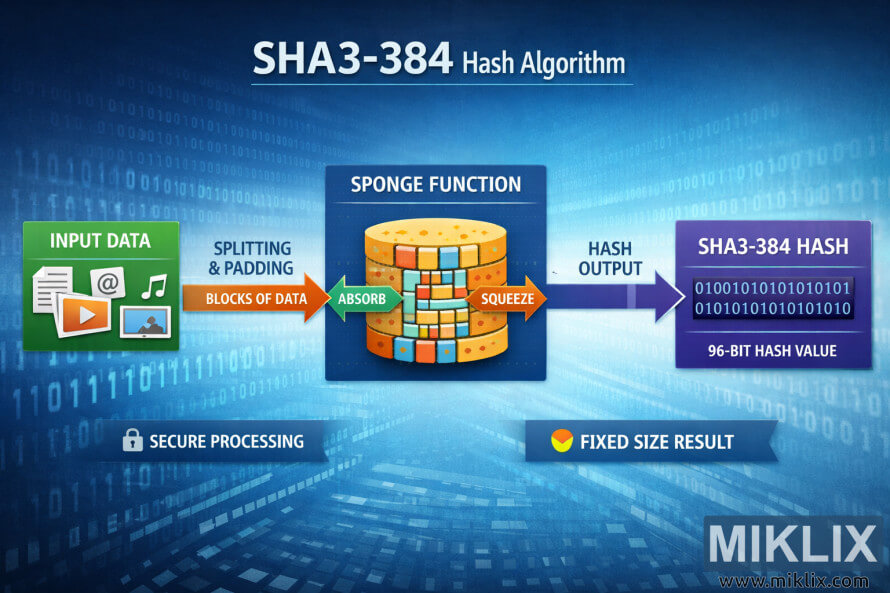
High-resolution landscape infographic that explains the SHA3-384 hashing process from input data through a sponge function to a fixed-size hash result.
Available versions of this image
The image files available for download below are less compressed and higher resolution - and as a result of that, higher quality - than the images embedded in articles and pages on this website, which are more optimized for file size in order to reduce bandwidth consumption.
Regular size (1,536 x 1,024)
Large size (3,072 x 2,048)
Very large size (4,608 x 3,072)
Extra large size (6,144 x 4,096)
Comically large size (1,048,576 x 699,051)
- Still uploading... ;-)
Image description
The image is a wide, landscape-oriented infographic that visually explains the flow of the SHA3-384 hash algorithm in a clear, non-technical way. The background is a cool blue digital scene with faint streams of binary digits fading into perspective, giving the impression of data moving through a virtual space. At the top center, large white lettering reads "SHA3-384 Hash Algorithm," establishing the subject of the diagram.
On the far left sits a green panel labeled "Input Data." Inside this box are simple icons representing common digital content, such as a document, an email symbol, a music note, a video play button, and an image thumbnail. These icons suggest that the algorithm can accept many kinds of information, without showing any actual file contents.
From this panel, a thick orange arrow points to the right and is annotated with "Splitting & Padding" and "Blocks of Data." This conveys the idea that incoming information is prepared and broken into pieces before being processed, while avoiding any low-level or potentially inaccurate details.
At the center of the image is the largest visual element, a dark blue box titled "Sponge Function." Inside it is a stylized cylindrical object made from colorful, interlocking rectangular blocks. The cylinder is drawn in a cutaway style so the inner blocks are visible, resembling a layered, modular structure. Two curved arrows are overlaid on the cylinder: a green arrow labeled "Absorb" pointing inward, and an orange arrow labeled "Squeeze" pointing outward. Together, they illustrate the high-level concept of data being taken into the internal state and later producing output.
To the right of the sponge function, a blue arrow labeled "Hash Output" continues the flow. It leads to a purple panel titled "SHA3-384 Hash." Inside this panel are several lines of binary-looking digits, presented as a generic pattern rather than a real hash value. Below the digits, a caption reads "Fixed-Size Hash Value," emphasizing that the result has a consistent length regardless of the input.
Along the bottom of the infographic are two small banner-style callouts. One shows a padlock icon with the words "Secure Processing," reinforcing the idea that the transformation is cryptographically secure. The other displays a circular gauge-like symbol next to the text "Fixed Size Result," summarizing one of the algorithm’s core properties.
Overall, the composition is clean and left-to-right, using bright contrasting colors, simple icons, and large labels to communicate the main stages of the SHA3-384 process without delving into specific internal parameters or mathematical details. The visual tone is educational and approachable, designed to help viewers grasp the concept of hashing at a glance.
The image is related to: SHA3-384 Hash Code Calculator